


How to Self Custody Crypto: The Complete Guide (Hardware Wallets, Seed Phrases & OpSec)
The catastrophic collapses of major centralized crypto institutions — from Mt. Gox and QuadrigaCX to Celsius, BlockFi, and FTX — taught global investors a brutal, unyielding lesson: when you hold your cryptocurrency on a centralized exchange, you do not own cryptocurrency. You own an unsecured IOU.
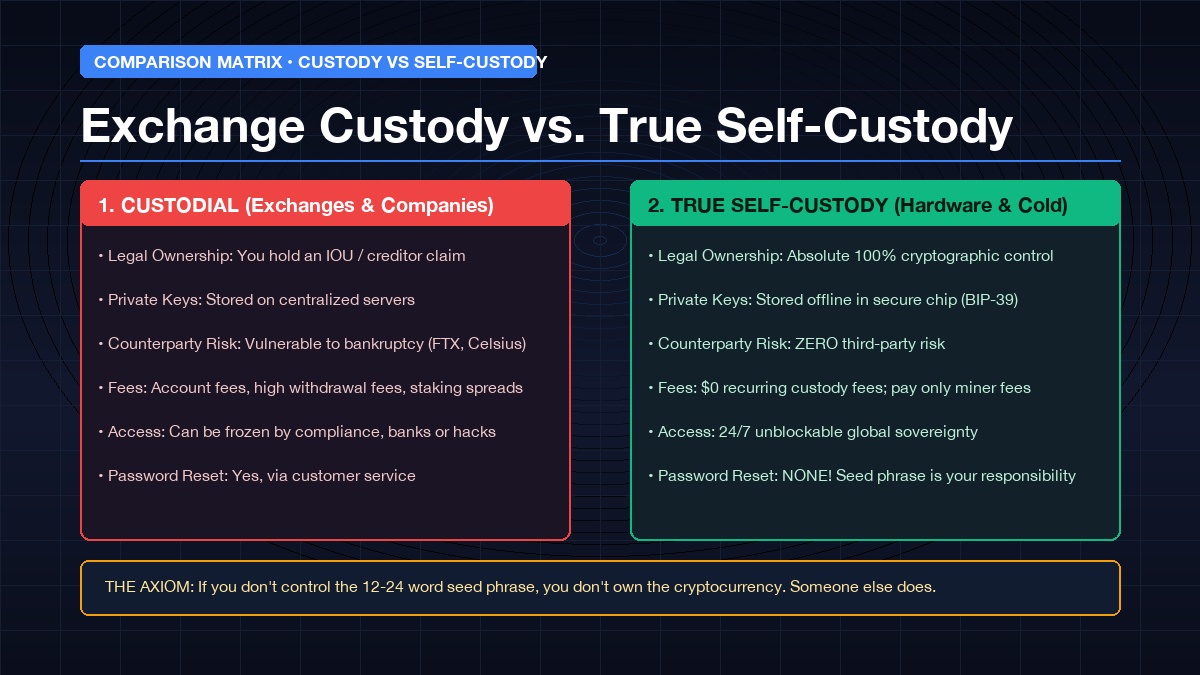
The crypto industry’s most enduring maxim, “Not your keys, not your coins,” is not mere philosophical dogma; it is an engineering reality. If an exchange holds your private cryptographic keys, they control your funds. They can halt your withdrawals during market panic, lend your coins to speculative hedge funds, comply with government asset freezes, or lose your wealth in corporate insolvency.
The only way to achieve true financial sovereignty, eliminate counterparty risk, and secure your Bitcoin, Ethereum, and digital assets against theft is through self-custody.
Whether you want to understand what crypto custody means, examine crypto custody fees and institutional companies, or follow a clear, actionable masterclass on how to self custody Bitcoin and your entire crypto portfolio, this comprehensive guide covers every technical and practical dimension.
1. What is Crypto Custody? (Crypto Custody Meaning & Mechanics)
To understand self-custody, we must first answer the foundational question: what is crypto custody, and how does crypto custody work?
In traditional banking, a custodian (such as BNY Mellon, State Street, or J.P. Morgan) physically or digitally holds assets — like gold bullion or book-entry stock shares — on behalf of a beneficiary. If a bank is robbed, fiat deposits are insured up to federal limits (such as FDIC in the US or FSCS in the UK).
In cryptocurrency, however, assets never leave the blockchain. Your Bitcoin, Ethereum, or Solana tokens do not sit inside your phone, laptop, or bank account. They exist as immutable ledger entries permanently broadcast across thousands of decentralized nodes.
                  ┌──────────────────────────────────────────────┐
                  │            THE BLOCKCHAIN LEDGER             │
                  │   Stores transaction history & balances      │
                  └──────────────────────┬───────────────────────┘
                                         │
                   ┌─────────────────────┴─────────────────────┐
                   │                                           │
  ┌────────────────▼─────────────┐           ┌─────────────────▼───────────┐
  │      CUSTODIAL (EXCHANGE)    │           │     TRUE SELF-CUSTODY       │
  │  Exchange holds Private Key  │           │   YOU hold Private Key      │
  │   You have a login & password│           │  Direct cryptographic power │
  │    Vulnerable to bankruptcy  │           │   Zero counterparty risk    │
  └──────────────────────────────┘           └─────────────────────────────┘
The Key Difference: Public Keys vs. Private Keys
Crypto custody is defined entirely by who controls the private key:
* Public Key (Address): Your account number. It can be shared publicly with anyone to receive funds.
* Private Key: A massive 256-bit cryptographic secret number. It acts as your sovereign digital signature. Anyone who possesses this private key can authorize transactions and move funds anywhere in the world.
When you leave crypto on Binance, Coinbase, or Kraken, the exchange holds the private keys. You merely have a username, password, and two-factor authentication (2FA). When you practice self-custody, you generate and hold the raw private keys, cutting out every financial intermediary on Earth.
Video Guide: Crypto Wallets and Self-Custody Explained
To see a clear visual breakdown of how wallet software communicates with the blockchain, watch this beginner-friendly tutorial:
2. Crypto Custody Companies vs. Self-Custody: A Detailed Breakdown
The crypto custody landscape is bifurcated into two distinct models: Institutional Third-Party Custody and Retail/Sovereign Self-Custody.
A) What are Crypto Custody Companies?
Crypto custody companies are specialized, heavily regulated trust companies and technology providers that safeguard digital assets for institutions, hedge funds, ETF issuers, and high-net-worth individuals.
Prominent Institutional Custody Companies Include:
1. Coinbase Custody: The leading custodian for US spot Bitcoin and Ethereum ETFs, operating qualified custodianship with SOC 1 and SOC 2 Type II certifications.
2. BitGo: Pioneer of commercial multi-signature (multisig) custody and regulated trust accounts, securing billions in institutional digital assets.
3. Anchorage Digital: The first federally chartered crypto bank in the United States, utilizing biometric hardware security modules (HSMs).
4. Fireblocks: An enterprise infrastructure provider utilizing Multi-Party Computation (MPC) algorithms to allow institutions to manage digital assets without single points of private key failure.
5. Fidelity Digital Assets: The crypto arm of Wall Street powerhouse Fidelity, providing cold storage custody for institutional asset managers.
B) Crypto Custody Fees: What Does It Cost?
Custody fees vary wildly depending on whether you use an institutional provider, a retail exchange, or manage self-custody yourself:
| Custody Type | Setup / Hardware Cost | Annual Custody Fee (AUC) | Withdrawal & Transfer Fees | Counterparty Risk |
|---|---|---|---|---|
| Institutional Custody | $1,000 – $10,000+ | 0.10% – 0.50% of assets | Network fees + manual review fee | Low (Insured / Regulated) |
| Retail Exchange (CEX) | $0.00 | 0.00% (monetized via staking/spread) | High flat withdrawal fees | HIGH (FTX/Celsius risk) |
| True Self-Custody | $50 – $200 (Hardware) | $0.00 (Zero ongoing fees) | Native on-chain miner fees only | ZERO (Pure sovereignty) |
Financial Insight: While retail exchanges advertise “free storage,” they monetize your idle assets through lending desks, internal market-making spreads, and steep withdrawal fees. In contrast, self-custody requires a modest one-time hardware purchase and carries zero recurring management fees for life.
3. What is a Self Custody Wallet? (Hot vs. Cold Storage)
A self-custody crypto wallet (also known as a non-custodial wallet) is a software application or dedicated hardware device that generates, encrypts, and stores your private keys locally.
The Universal Standard: BIP-39 Seed Phrases
Almost all modern self-custody wallets utilize the BIP-39 industry standard. When you initialize a wallet, a cryptographic algorithm translates your complex 256-bit master private key into a human-readable sequence of 12 or 24 random English words (known as your Seed Phrase, Mnemonic Phrase, or Secret Recovery Phrase).
- The Seed Phrase IS your money: If your phone breaks, your laptop crashes, or your hardware device falls into the ocean, you can enter those 12 or 24 words into any compatible wallet worldwide and restore 100% of your funds instantly.
- Anyone with your seed phrase can steal your assets: It bypasses all PINs, passwords, and biometric locks.
Hot Wallets vs. Cold Wallets Compared
| Feature | Hot Wallets (Software) | Cold Wallets (Hardware) |
|---|---|---|
| Internet Connection | Constantly connected to the internet | Completely offline (air-gapped or USB) |
| Examples | Phantom, MetaMask, Trust Wallet, Exodus | Trezor Safe 3, Ledger Nano, Coldcard, Bitkey |
| Vulnerability to Malware | Vulnerable to keyloggers & clipboard hijackers | Immune to online computer malware |
| Transaction Signing | Handled in browser or mobile operating system | Signed offline inside a secure element chip |
| Cost | 100% Free | $50 to $200 USD |
| Best Used For | Daily DeFi transactions, small trading balances (<$1,000) | Long-term savings, wealth preservation (95%+ of funds) |
4. How to Self Custody Bitcoin (The Sovereign Standard)
Bitcoin was designed from the ground up to be held without banks. For Bitcoiners, self-custody is the pinnacle of the asset’s value proposition.
Step-by-Step: The Best Way to Self Custody Bitcoin
[Exchange / Brokerage] ──(Withdraw BTC)──> [Native SegWit: bc1q... / Taproot: bc1p...] ──> [Cold Storage Device]
- Select a Dedicated Bitcoin Hardware Wallet:
- Blockstream Jade ($65): Open-source, supports full air-gapped camera signing via QR codes, and includes liquid network support.
- Coldcard Q / Mk4 ($150 – $230): The gold standard for Bitcoin purists. Features true air-gap operation via MicroSD card, dual secure elements, and anti-tamper packaging.
- Bitkey ($150): Built by Block (Jack Dorsey), offering an intuitive 2-of-3 multisig setup combining a hardware key, a mobile app, and cloud recovery.
- Trezor Safe 3 ($79): Budget-friendly, fully open-source with a certified Secure Element (EAL6+).
- Pair with Sovereign Coordinator Software:
- Instead of using proprietary software, pair your hardware wallet with open-source desktop coordinators like Sparrow Wallet or Electrum.
- Choose the Right Address Format:
- Always generate Native SegWit (bech32, starting with
bc1q) or Taproot (starting withbc1p) addresses. These formats reduce future transaction miner fees by 30% to 50% compared to legacy addresses (starting with1or3). - Advance to Multi-Signature (For Large Holdings):
- High-net-worth Bitcoin holders utilize 2-of-3 multi-signature vaults (using tools like Unchained, Casa, or Sparrow). This setup requires signatures from two separate hardware devices stored in different geographic locations to move funds, eliminating single points of failure.
Video Guide: How to Self-Custody Bitcoin Step-by-Step
Watch this practical, step-by-step masterclass demonstrating how to set up Bitcoin cold storage properly:
5. Masterclass: How to Self Custody Your Crypto (Step-by-Step)
Follow this bulletproof 6-stage protocol to transition your assets from centralized exchanges into sovereign self-custody:
Stage 1: Purchase Hardware Directly from the Manufacturer
- Never buy a hardware wallet from Amazon, eBay, or third-party resellers. Compromised devices with pre-installed malicious firmware have resulted in millions in stolen funds.
- Order directly from official websites (e.g., trezor.io, ledger.com, coinkite.com, blockstream.com).
- Inspect the tamper-evident holographic seal upon delivery.
Stage 2: Initialize in a Private, Offline Setting
- Connect your device to an isolated computer.
- Generate a fresh 12- or 24-word seed phrase generated by the device’s true random number generator (TRNG).
- Rule of Absolute Security: Never type these words into your computer keyboard, never take a smartphone photo, and never say them aloud near voice-activated smart speakers (Alexa, Siri).
Stage 3: Stamp Your Seed Phrase in Stainless Steel
Paper Burns. Paper molds. Paper gets destroyed in house fires or floods.
* Invest in a stainless steel backup plate or capsule (such as Cryptosteel, Keystone Tablet, or Coldcard Seedplate).
* Steel withstands temperatures up to 1,400°C (2,550°F) and survives severe structural disasters.
Stage 4: Perform the “Dry Run” Recovery Test
Before depositing your life savings, verify that your backup works:
1. Note your wallet’s first receiving address.
2. Deliberately wipe / factory reset the hardware device.
3. Use your steel backup to restore the wallet using your 12 or 24 words.
4. Verify that the recovered receiving address matches the address you wrote down. This confirms that your backup is 100% accurate.
Stage 5: Send a Small Test Transaction First
- Never transfer an entire portfolio in a single transaction.
- Copy your wallet address, navigate to your exchange withdrawal screen, and send a minimal test amount (e.g., $10 to $20 of crypto).
- Wait for blockchain confirmation, verify that the funds arrived in your cold wallet, and only then proceed with the remaining balance.
Stage 6: Implement Passphrase Protection (“The 25th Word”)
- Advanced cold storage utilizes BIP-39 passphrases. By creating an arbitrary custom word or phrase, you create an entirely separate, hidden wallet.
- If an attacker forces you to unlock your hardware wallet under physical duress, you can enter your standard PIN to reveal a dummy wallet with nominal funds, while your real wealth remains hidden inside the passphrase-protected vault.
6. Hardware Wallet Comparison Matrix
| Hardware Device | Price (USD) | Security Architecture | Air-Gapped Signing | Open Source? | Best For |
|---|---|---|---|---|---|
| Trezor Safe 3 | ~$79 | Secure Element (Optiga Trust M) | No (USB-C) | 100% Open Source | Best Value for Multi-Crypto Investors |
| Blockstream Jade | ~$65 | Virtual Secure Element / PIN Server | Yes (Camera QR) | 100% Open Source | Best Budget Bitcoin-Only Device |
| Coldcard Mk4 / Q | $157 / $229 | Dual Secure Elements (EAL6+) | Yes (MicroSD & NFC) | Source-Available | Best Overall for Maximum Bitcoin Security |
| Ledger Nano X | ~$149 | ST33J2M0 Secure Element | No (Bluetooth / USB) | Closed Firmware | Mobile-first Web3 & multi-chain investors |
| Bitkey | ~$150 | Secure Element + 2-of-3 Multisig | NFC Mobile | Hardware Open | Frictionless Bitcoin self-custody |
7. The 5 Deadly Mistakes of Crypto Self-Custody (And How to Avoid Them)
- Entering Seed Phrases on Websites: No legitimate software, DeFi app, or customer support agent will ever ask for your 12- or 24-word recovery phrase. Entering it into a webpage is an instant 100% loss.
- Blind-Signing Malicious Smart Contracts: When interacting with Web3 protocols, verify every transaction on your hardware wallet’s physical screen. Use a dedicated “hot burner wallet” for daily NFT mints and keep your long-term vault isolated.
- Storing Digital Copies of Seed Phrases: Storing your words in a password manager, iCloud, Google Drive, or an email draft defeats the purpose of cold storage.
- Neglecting Inheritance Planning: If you pass away tomorrow, can your family access your crypto? Document a clear, secure inheritance protocol with step-by-step instructions (without storing your seed phrase in unencrypted text in a will).
- Ignoring Network Addresses: Sending Bitcoin to a Bitcoin Cash address, or sending Solana to an Ethereum address, can result in permanently lost funds. Always verify the first and last 4 characters of your receiving address.
Frequently Asked Questions (FAQ)
What does self custody mean in crypto?
Self-custody means you are the sole possessor of the private cryptographic keys that control your cryptocurrency on the blockchain. You do not rely on any third party, bank, or centralized exchange to hold, manage, or authorize your transactions.
What happens if I lose my hardware wallet?
Losing your physical hardware wallet does not mean your crypto is lost. Your coins live on the blockchain, not on the physical plastic device. As long as you possess your 12- or 24-word seed phrase, you can purchase any new hardware wallet (even from a different brand) and recover all your assets within minutes.
What are the fees associated with self-custody?
Unlike banks or institutional custody companies (which charge 0.10% to 0.50% annually), self-custody has zero ongoing storage fees. You pay only a one-time purchase price for your hardware device ($50 to $200) and standard on-chain network miner fees whenever you broadcast a transaction.
Can governments freeze a self-custody crypto wallet?
No. Because private keys are stored locally on your offline device and transactions are processed by decentralized global networks of validators, no government, court, or corporation can freeze or reverse a transaction from a properly secured self-custody wallet.
ThreeDolar Wealth & Financial Tools
Analyze global assets, stock valuations, and financial metrics with our free tools:

I started investing in 2014, my first stock was ABEV3 (R$50). I’ve worked with forex, futures, crypto, and derivatives. Here, I share ideas in a relaxed way.